A quarto shortcode extension to add Bootstrap accordion component for html and revealjs formats. Minimal non-interactive fallbacks are provided for other output formats pdf and typst.
1 Install
- Requires Quarto >= 1.4.0
- In the root of the quarto project, run in terminal:
quarto add royfrancis/quarto-accordionThis will install the extension under the _extensions subdirectory.
2 Syntax
- Define accordion contents (header, body)
- Insert shortcode in the quarto document
Here is the syntax where [text] is replaced as needed.
---
accordion:
  - [label]:
    - header: [text content for the header]
      body: [text content for the body]
      collapsed: [true/false, optional, defaults to true]
      id: [text, optional, defaults to auto-generated]
---

{{< accordion [label] >}}
In this example, the arguments were defined in the YAML metadata. Arguments can also be defined directly in the shortcode. This is referred to as ‘Inline’. The optional label sets a custom accordion id (defaults to auto-generated from content), while header, body, collapsed and id control the item content.
{{< accordion label="[label, optional, defaults to auto-generated]" header="[text content for the header]" body="[text content for the body]" collapsed="[true/false, optional, defaults to true]" id="[text, optional, defaults to auto-generated]" >}}You can also mix and match these approaches in the same document as is the case in this document.
If a custom label is provided, only use alphabets, numbers, hyphens and underscores.
3 Minimal usage
3.1 YAML metadata
---
accordion:
  - simple:
    - header: Click here to view contents
      body: This is the body content
---

{{< accordion simple >}}3.2 Inline content
{{< accordion header="Click here to view contents" body="This accordion is defined inline." >}}4 More accordion items
4.1 YAML metadata
---
accordion:
  - many-items:
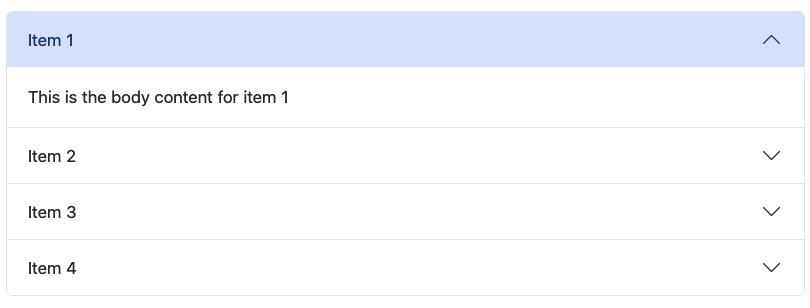
    - header: Item 1
      body: This is the body content for item 1
    - header: Item 2
      body: This is the body content for item 2
    - header: Item 3
      body: This is the body content for item 3
    - header: Item 4
      body: This is the body content for item 4
---

{{< accordion many-items >}}4.2 Inline content
Multiple inline items are defined using JSON.
{{< accordion items='[{"header":"Inline Item 1","body":"Content for inline item 1."},{"header":"Inline Item 2","body":"Content for inline item 2."}]' >}}5 Multiple accordions
---
accordion:
  - ac-1:
    - header: Item 1
      body: This is the body content for item 1
    - header: Item 2
      body: This is the body content for item 2
  - ac-2:
    - header: Item 1
      body: This is the body content for item 1
    - header: Item 2
      body: This is the body content for item 2
---

**Topic A**

{{< accordion ac-1 >}}

**Topic B**

{{< accordion ac-2 >}}
Topic A
Topic B
6 Collapse state
All accordion items are collapsed as the default state. Any of the accordion items can be initialized as expanded by setting collapsed as false.
6.1 YAML metadata
---
accordion:
  - ac-3:
    - header: Item 1
      body: This is the body content for item 1
    - header: Item 2
      body: This is the body content for item 2
      collapsed: false
  - ac-4:
    - header: Item 1
      body: This is the body content for item 1
      collapsed: false
    - header: Item 2
      body: This is the body content for item 2
---

{{< accordion ac-3 >}}

{{< accordion ac-4 >}}6.2 Inline content
{{< accordion header="This item starts expanded" body="Set collapsed to false to show content by default." collapsed="false" >}}7 Item IDs
Accordion items are automatically given unique ids. This should generally work fine. In case of a conflict, IDs can be set manually using id.
7.1 YAML metadata
---
accordion:
  - id-conflict:
    - header: Bla
      body: bla
    - header: Bla
      body: bla
  - id-conflict-resolved:
    - header: Bla
      body: bla
    - header: Bla
      body: bla
      id: my-id
---

An example of accordion items with conflicting IDs where two accordion items have the same ids and hence open/close together.

{{< accordion id-conflict >}}

Using custom ID to resolve conflict and now they work independently.

{{< accordion id-conflict-resolved >}}
An example of accordion items with conflicting IDs where two accordion items have the same ids and hence open/close together.
Using custom ID to resolve conflict and now they work independently.
7.2 Inline content
{{< accordion header="Custom item id" body="Custom ids are useful when you need anchor links." id="custom-item-1" >}}8 CSS styling
To target all accordian sub components on a page, target the class .quarto-accordion.
/*-- scss:rules --*/

.quarto-accordion .accordion-header-content {
  font-weight: 700;
}
To target specific accordions, use the label of that accordion as id. For example an accordion labelled custom-css. Here is the qmd file.
---
accordion:
  - custom-css:
    - header: This header has style
      body: This body has style
format:
  html:
    css: styles.scss
---

{{< accordion custom-css >}}
And here is the css file.
/*-- scss:rules --*/

#quarto-accordion-custom-css .accordion-header-content {
  font-weight: 700;
  color: red
}

#quarto-accordion-custom-css .accordion-body-content {
  color: green;
}9 Markdown formatting
Markdown text formatting is supported in yaml metadata.
---
accordion:
  - markdown-formatting:
    - header: "**How much markdown formatting can I have in an accordion?**"
      body: "This is **bold** and *italic*"
---

{{< accordion markdown-formatting >}}Multiline content and markdown formatting is supported in yaml metadata.
---
accordion:
- multiline-markdown-formatting:
- header: "**How much markdown formatting can I have in an accordion?**"
body: |
This is multiline yaml content.
This is **bold** and *italic*. This is a [URL](https://quarto.org).
This is a markdown image
This is a markdown table.
|Item|Category|
|Spools|Marketing|
|Cutters|Marketing|
|Pins|Logistics|
---
{{< accordion multiline-markdown-formatting >}}This is multiline yaml content.
This is bold and italic. This is a URL.
This is a markdown image

This is a markdown table.
| Item | Category |
|---|---|
| Spools | Marketing |
| Cutters | Marketing |
| Pins | Logistics |
10 HTML formatting
HTML content in yaml metadata is supported.
---
accordion:
  - html-formatting:
    - header: "<b>How much HTML formatting can I have in an accordion?</b>"
      body: "This is <b>bold</b> and <i>italic</i>"
---

{{< accordion html-formatting >}}Multiline HTML content is supported in yaml metadata.
---
accordion:
  - multiline-html-formatting:
    - header: "<b>How does the accordion handle HTML?</b>"
      body: |
        This is multiline yaml content.

        This is <b>bold</b> and <i>italic</i>. This is a <a href="https://quarto.org">URL</a>.

        This is an html image

        <img src="preview.jpg" alt="Image" style="max-width: 100%; height: auto;" />
---

{{< accordion multiline-html-formatting >}}11 Other formats
The accordion shortcode is designed for html output. For formats pdf and typst, the accordion component degrades gracefully to show all content without interactivity. Markdown formatting is supported in these formats but HTML formatting is not. Accordions also work in revealjs presentation format.