dag <- as_dag(
  data.frame(from = c("a", "a", "b", "c"), to = c("b", "c", "d", "d")),
  nodes = data.frame(
    name = c("a", "b", "c", "d"),
    type = c("input", "process", "process", "output")
  )
)
The default palette
With node_color = NULL (the default), each node gets its own color from metro_palette() - dagviz’s palette, extended with generated colors so that no color is ever repeated. There is no legend:
ggplot_dag(dag)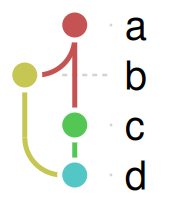
scales_df <- data.frame(x = 1:30, color = metro_palette(30))
ggplot2::ggplot(scales_df, ggplot2::aes(x, 1, fill = I(color))) +
  ggplot2::geom_tile() +
  ggplot2::theme_void()
The first 18 colors are dagviz’s own; further colors are generated, so any number of nodes gets distinct colors. metro_palette(n) is always the first n colors of a longer palette, so a node keeps its color as nodes are added after it.
A palette you supply is never recycled either: if a vector (or function) gives fewer colors than there are nodes (or, with node_color set to a column, distinct values), ggplot_dag() stops with an error rather than reusing colors.
targets status colors
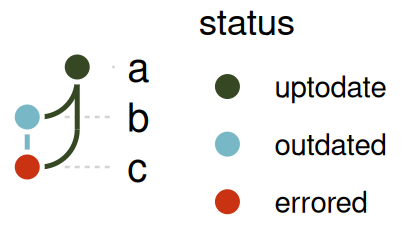
targets_status_colors() is targets::tar_visnetwork()’s own status palette, for coloring by build status:
status_dag <- as_dag(
  data.frame(from = c("a", "a", "b"), to = c("b", "c", "c")),
  nodes = data.frame(
    name = c("a", "b", "c"),
    status = c("uptodate", "outdated", "errored")
  )
)
ggplot_dag(
  status_dag,
  node_color = "status",
  palette = targets_status_colors()
)
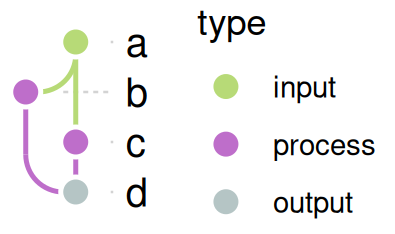
Coloring by a column
Any node column works the same way - distinct values are mapped to the palette (by order of first appearance, or factor level order), with a fill legend:
ggplot_dag(dag, node_color = "type")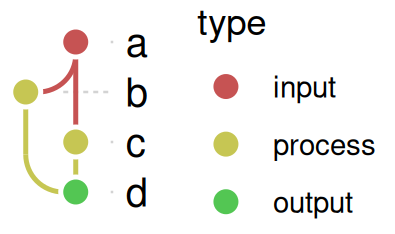
(A type column holding targets’ own vertex types also sets the node shapes, see targets_node_shapes(). Coloring by that same column then merges the color and shape legends into one; coloring by another column, such as status, gives two.)
A node with no value in the column (NA) takes no color from the palette. It is drawn gray, without a legend entry and without a warning, and so are the edges drawn in its color (a value that a named palette doesn’t name is gray too, but with a warning). A column of nothing but NA has no legend at all.
A named palette
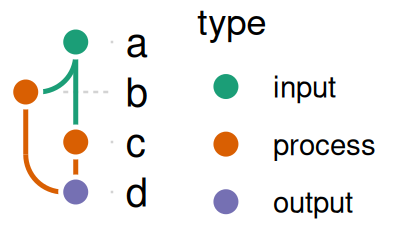
A named color vector is matched by value, not position - useful when you want specific colors for specific categories, not just “the next one in the palette”:
ggplot_dag(
  dag,
  node_color = "type",
  palette = c(
    input = "#1b9e77",
    process = "#d95f02",
    output = "#7570b3"
  )
)
Setting colors by hand
To choose the color of every node yourself, color by the name column and give a named palette with one entry per node. Edges follow along, since they take their source node’s color by default. The legend only repeats the node labels here, so it is dropped:
ggplot_dag(
  dag,
  node_color = "name",
  palette = c(
    a = "#1b9e77",
    b = "#d95f02",
    c = "#7570b3",
    d = "#e7298a"
  )
) +
  ggplot2::guides(fill = "none")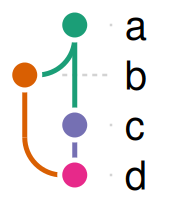
Names are matched by value, so the order of the vector doesn’t matter. A node missing from the palette is drawn gray, with a warning.
To give every node the same color, pass a color instead of a column name; edge_color takes a single color the same way. Neither adds a legend:
ggplot_dag(dag, node_color = "steelblue", edge_color = "gray60")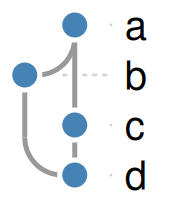
Palettes from other packages
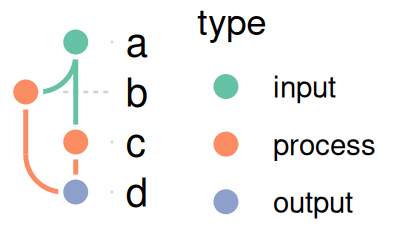
Anything that’s a function(n) returning n colors works directly as palette:
ggplot_dag(dag, node_color = "type", palette = viridisLite::viridis)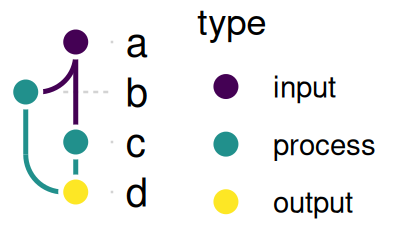
ggplot_dag(
  dag,
  node_color = "type",
  palette = function(n) RColorBrewer::brewer.pal(max(n, 3), "Set2")
)
randomcoloR::distinctColorPalette also fits directly - since it’s random, set.seed() first for a repeatable plot:
set.seed(42)
ggplot_dag(
  dag,
  node_color = "type",
  palette = randomcoloR::distinctColorPalette
)
Edge colors
By default (edge_color = "source"), each edge is drawn in its source node’s color.
ggplot_dag(dag, edge_color = "source")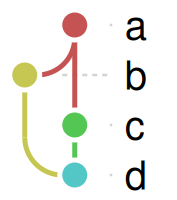
ggplot_dag(dag, edge_color = "target")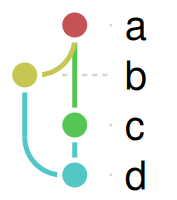
ggplot_dag(dag, edge_color = "gray50")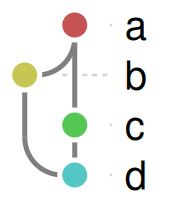
Edge coloring currently has no legend (unlike node coloring) - if you need one, edge_paths (in a dag_layout) carries the same from/to/piece shape you could build your own geom_path() legend from.