A pipeline with too many targets can be hard to read. But, if the targets can be categorized into a handful of stages (ingest, model, report etc.), a collapsed graph can be generated with one node per stage. tar_ggplot(collapse_by = ) and dag_collapse() allow to collapse the targets that share a value of a column into a single node, and the dependencies between the groups become one edge each.
Where the stages come from
targets has no tag or category field for a target. It has one free-form text field, description, and that is where a stage goes for now. tar_network() returns it as a column, and tar_dag() keeps it, so collapse_by = "description" works as it is.
A description is set for one target with the description argument of tar_target(). Targets with the same text are one stage:
list(
  tar_target(raw_a, load_raw(1), description = "ingest"),
  tar_target(clean_a, clean(raw_a), description = "ingest"),
  tar_target(fit_1, fit(clean_a), description = "model")
)
Writing it for every target gets repetitive in a larger pipeline. tar_option_set(description = ) sets the description of every target defined after it, so a stage is written once, for a block of targets. A description given to tar_target() still takes precedence over the option for that target. The pipeline below has three stages, set a block at a time, and ends with a reset, tar_option_set(description = character(0)), so that nothing after the last block gets a stage by accident. config comes first, before any description is set, so it has none:
tar_script({
  load_raw <- function(seed) {
    set.seed(seed)
    rnorm(20)
  }
  # its own loader, so that a later edit touches only raw_b
  load_b <- function() {
    set.seed(2)
    rnorm(20)
  }
  clean <- function(x) x[abs(x) < 3]
  combine2 <- function(a, b) c(a, b)
  fit <- function(x, shift = 0) mean(x) + shift
  render <- function(x, y) paste(round(mean(x), 3), round(mean(y), 3))

  config_targets <- list(tar_target(config, list(shift = 1)))

  tar_option_set(description = "ingest")
  ingest_targets <- list(
    tar_target(raw_a, load_raw(1)),
    tar_target(raw_b, load_b()),
    tar_target(clean_a, clean(raw_a)),
    tar_target(clean_b, clean(raw_b))
  )

  tar_option_set(description = "model")
  model_targets <- list(
    tar_target(features, combine2(clean_a, clean_b)),
    tar_target(fit_1, fit(features, config$shift)),
    tar_target(fit_2, fit(features))
  )

  tar_option_set(description = "report")
  report_targets <- list(
    tar_target(summary_all, combine2(fit_1, fit_2)),
    tar_target(report_doc, render(summary_all, features))
  )

  tar_option_set(description = character(0))
  c(config_targets, ingest_targets, model_targets, report_targets)
})
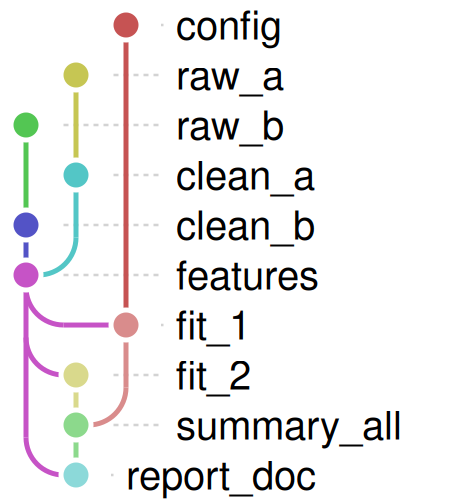
The pipeline as it is, one row per target:
One node per stage
With collapse_by = "description" the targets of a stage are one node, named after the stage, with the number of targets in its label. config, which has no description, stays as it is:
tar_ggplot(collapse_by = "description")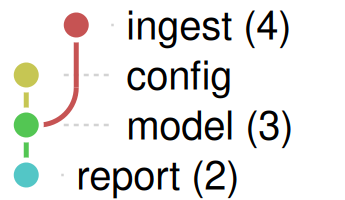
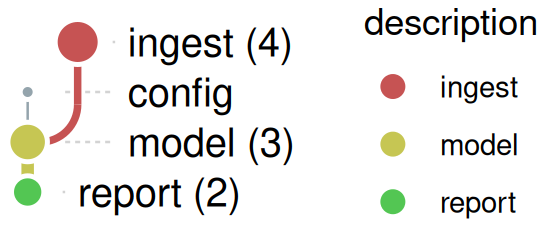
n, the number of targets in a node and of dependencies in an edge, can set the size of a node and the width of an edge with node_size = "n" and edge_width = "n". node_color = "description" colors the nodes by stage:
tar_ggplot(
  collapse_by = "description",
  node_color = "description",
  node_size = "n",
  edge_width = "n"
)
The same collapsed graph from a dag, for when you also want to look at or change the nodes first:
d <- tar_dag()
small <- dag_collapse(d, "description")
small$nodes[c("name", "label", "n")]
#>     name      label n
#> 1 ingest ingest (4) 4
#> 2 config     config 1
#> 3  model  model (3) 3
#> 4 report report (2) 2
small$edges
#>     from     to n
#> 1 ingest  model 2
#> 2 config  model 1
#> 3  model report 3
Colors and status
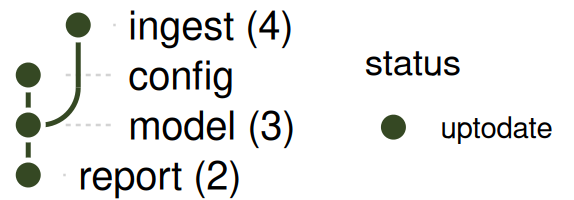
A node can be colored by build status, as for the full pipeline. A stage whose targets all have the same status shows it, and the collapsed graph after a build is all up to date:
tar_make(reporter = "silent")
tar_ggplot(
  collapse_by = "description",
  node_color = "status",
  palette = targets_status_colors()
)
Now load_b() changes (here with a text substitution in _targets.R, in place of editing the file). raw_b and everything that depends on it are outdated, but raw_a is not, so the targets of the ingest stage no longer share a status:
script <- readLines("_targets.R")
writeLines(sub("set.seed(2)", "set.seed(3)", script, fixed = TRUE), "_targets.R")
tar_ggplot(
  collapse_by = "description",
  node_color = "status",
  palette = targets_status_colors()
)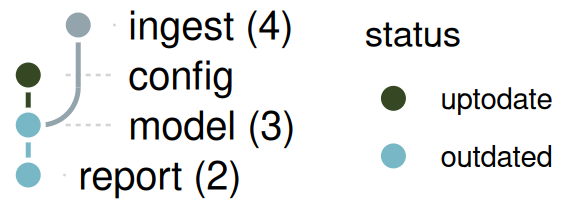
A stage with different statuses has no status of its own, so it is drawn gray, without an entry in the legend. Its lines are still there. The same goes for any node that has no value in the column node_color names. (The gray is the one targets_status_colors() uses for the none status, of the functions and objects that targets_only = FALSE adds, so with both in one plot a gray node can be either.)
Things to know
-
End a block of descriptions with a reset.
tar_option_set(description = character(0))puts the default back. Without it, the option stays set for every target defined after the block, including those in files loaded later withtar_source(). -
tarchetypes::tar_map()changes the description. By default (descriptions = tidyselect::everything()) it appends the mapped values to each description,"ingest 1 x", so the targets it makes would each be a stage of their own. Passdescriptions = NULLto keep the stage’s description. -
The descriptions must match exactly.
"ingest"and"Ingest "are two stages. - A target with no description is a node of its own. A stage can’t have the name of such a target: that is an error, because the two would be merged.
-
descriptionis also the label of a target intar_manifest()andtar_visnetwork(). A short stage name is a good description there. A sentence is a poor key.
Metadata of your own
targets can’t carry any other field for a target, but a column can be added to the nodes of tar_dag()’s result, and dag_collapse() takes any column. Here, two people own some of the targets, and the rest have no owner:
d <- tar_dag()
owner <- c(config = "ana", raw_a = "ana", clean_a = "ana", raw_b = "ben", clean_b = "ben")
d$nodes$owner <- unname(owner[d$nodes$name]) # NA for the rest
ggplot_dag(dag_collapse(d, "owner"), node_color = "owner", node_size = "n")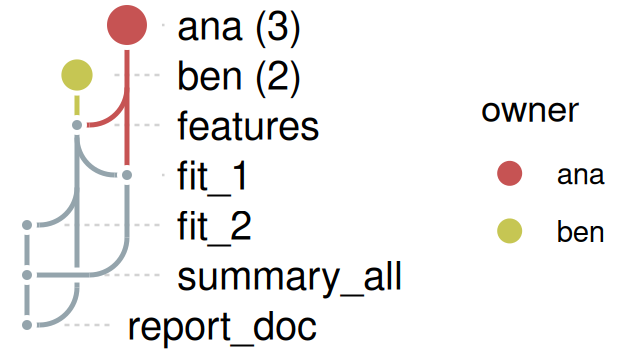
The targets without an owner stay as they are, in gray. The names row, col, x, y and color_index can’t be used for a column: the layout keeps them for its own.
When stages depend on each other both ways
If one stage has a target that depends on a target of another stage, and that stage has a target that depends back on the first, the collapsed graph would have a loop, which a DAG can’t have. That is an error, and it names the stages and the edges behind it:
tar_script(list(
  tar_target(a1, 1, description = "A"),
  tar_target(b1, a1, description = "B"),
  tar_target(a2, b1, description = "A")
))
try(tar_ggplot(collapse_by = "description"))
#> Error : dag_collapse(): collapsing by `description` creates a cycle: A -> B -> A
#> Through these edges:
#>   A -> B: a1 -> b1
#>   B -> A: b1 -> a2
Either of the two targets of stage A can be moved into a stage of its own, or into stage B, to break the loop. tar_ggplot() without collapse_by still draws the pipeline.