The metro style is an R reimplementation of the Python package dagviz (Wim Yedema, Apache-2.0), which snakevision’s workflow diagrams also use. This article walks through what the layout does, on small examples chosen to show one idea at a time.
Row order
Every node gets its own row, in topological order: a node’s row always comes after every node it depends on. Ties (nodes with no dependency between them) are broken by insertion order - the order nodes and edges were added, not alphabetical or any other sort:
dag <- as_dag(
  data.frame(
    from = character(0),
    to = character(0)
  ),
  nodes = data.frame(name = c("z", "m", "a", "x"))
)
ggplot_dag(dag)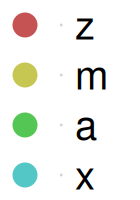
dag_layout(dag, style_metro())$nodes[, c("name", "row")]
#>   name row
#> 1    z   0
#> 2    m   1
#> 3    a   2
#> 4    x   3
Column allocation
A node’s own column is a lane: once it has more than one thing depending on it, that lane has to stay open until the last one consumes it. A new node takes the most recently freed lane, or opens a new one to the left if none is free:
dag2 <- as_dag(data.frame(from = "root", to = c("leaf1", "leaf2", "leaf3")))
ggplot_dag(dag2)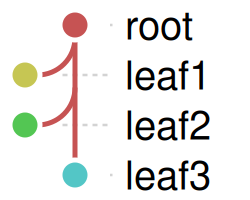
dag_layout(dag2, style_metro())$nodes[, c("name", "row", "col")]
#>    name row col
#> 1  root   0   0
#> 2 leaf1   1  -1
#> 3 leaf2   2  -1
#> 4 leaf3 3 0root’s own lane (column 0) stays open until leaf3, the last of its children, consumes it. leaf1 has no children of its own, so the column it opens (-1) is free again at once, and leaf2 takes it. leaf3 consumes the last of root’s lane, which frees it, so leaf3 takes that lane and ends up back in column 0.
Lane reuse
Freed lanes are reused last-in-first-out: a node takes the lane that was freed last. In this diamond, a’s lane (out-degree 2) stays open through b, which opens a column of its own (-1). c consumes the last of a’s lane, which frees it, so c reuses it, in column 0. Then d consumes both b and c: b’s lane frees first and c’s second, so d takes c’s, column 0 again, rather than opening a new one:
dag3 <- as_dag(
  data.frame(from = c("a", "a", "b", "c"), to = c("b", "c", "d", "d"))
)
ggplot_dag(dag3)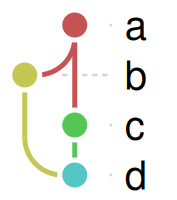
dag_layout(dag3, style_metro())$nodes[, c("name", "row", "col")]
#>   name row col
#> 1    a   0   0
#> 2    b   1  -1
#> 3    c   2   0
#> 4    d   3   0
Arcs
When a lane’s row isn’t in the same column as the node consuming it, the connection bends: a quarter-circle arc from the lane down to the row, then a short horizontal run into the node. b and d above already showed one each; a node with several inputs arriving from different columns shows more clearly:
dag4 <- as_dag(data.frame(from = c("src1", "src2", "src3"), to = "sink"))
ggplot_dag(dag4)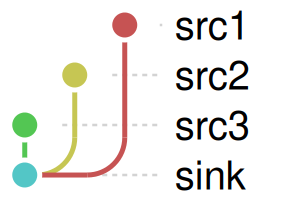
Bridges
Where a horizontal run crosses another lane’s vertical line, a white “bridge” is drawn on top of the vertical line first, then the horizontal line on top of that - the gap is what makes it read as an underpass instead of a crossing:
dag5 <- as_dag(
  data.frame(from = c("a", "a", "b", "c"), to = c("c", "d", "d", "e"))
)
ggplot_dag(dag5)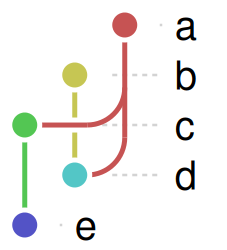
Putting it together
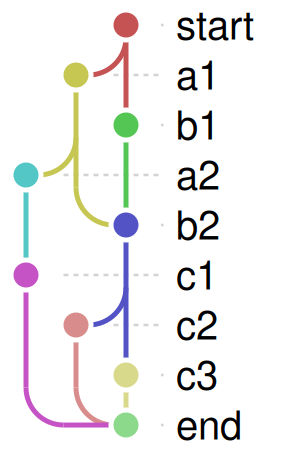
A larger graph combines all of the above - several lanes open and close, arcs and bridges appear wherever a connection doesn’t run straight down:
edges <- data.frame(
  from = c(
    "start",
    "start",
    "a1",
    "a1",
    "a2",
    "b1",
    "b2",
    "b2",
    "c1",
    "c2",
    "c3"
  ),
  to = c("a1", "b1", "a2", "b2", "c1", "b2", "c2", "c3", "end", "end", "end")
)
ggplot_dag(as_dag(edges))