


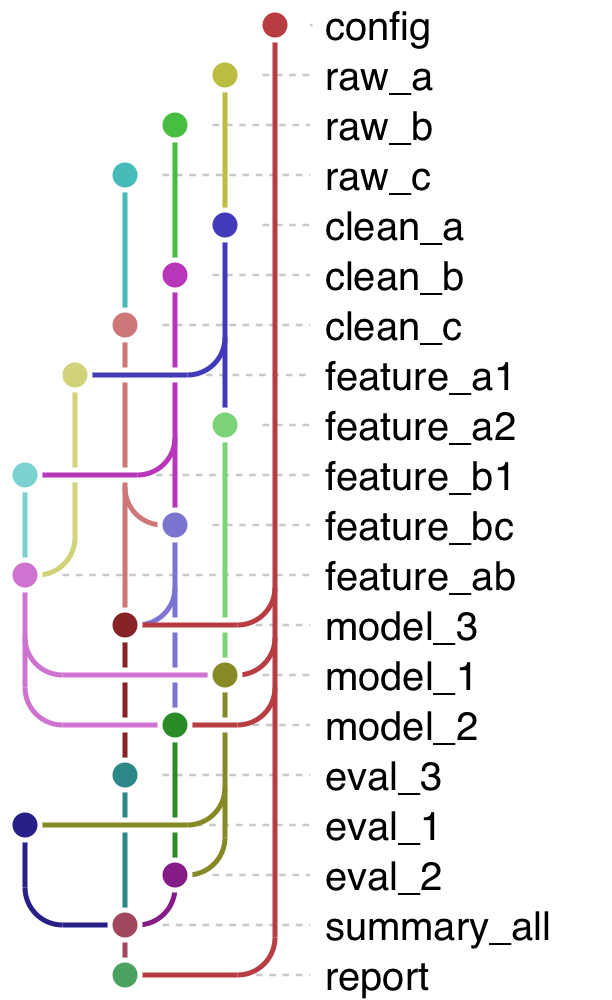
ggtargets creates metro-style diagrams of the dependency graphs of targets pipelines, and of other directed acyclic graphs, using ggplot2.
Installation
There are several ways to install ggtargets: from GitHub, from r-universe, with pixi, or with conda. Choose your preferred method.
-
Install from GitHub:
# install.packages("remotes") remotes::install_github("royfrancis/ggtargets") -
Install from r-universe:
install.packages( "ggtargets", repos = c("https://royfrancis.r-universe.dev", "https://cloud.r-project.org") ) -
Install with pixi from the prefix.dev channel:
-
Install with conda from the prefix.dev channel:
Quick start
Inside a targets project:
library(ggtargets)
tar_ggplot()
tar_ggplot(node_color = "status", palette = targets_status_colors())
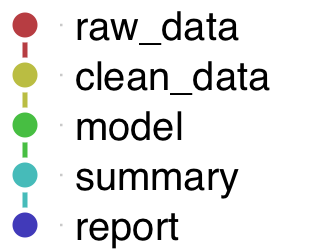
Example: a targets pipeline
withr::with_dir(withr::local_tempdir(), {
  targets::tar_script(list(
    tar_target(n, 20),
    tar_target(raw_data,
      data.frame(x = seq_len(n), y = seq_len(n) * 2 + rnorm(n))
    ),
    tar_target(clean, raw_data[complete.cases(raw_data), ]),
    tar_target(model, lm(y ~ x, data = clean)),
    tar_target(summary, coef(model)),
    tar_target(report, capture.output(print(summary)))
  ))
  tar_ggplot()
})
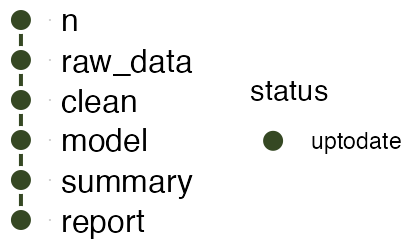
Color by build status to see what’s out of date at a glance:
withr::with_dir(withr::local_tempdir(), {
  targets::tar_script(list(
    tar_target(n, 20),
    tar_target(raw_data,
      data.frame(x = seq_len(n), y = seq_len(n) * 2 + rnorm(n))
    ),
    tar_target(clean, raw_data[complete.cases(raw_data), ]),
    tar_target(model, lm(y ~ x, data = clean)),
    tar_target(summary, coef(model)),
    tar_target(report, capture.output(print(summary)))
  ))
  targets::tar_make(reporter = "silent")
  tar_ggplot(node_color = "status", palette = targets_status_colors())
})
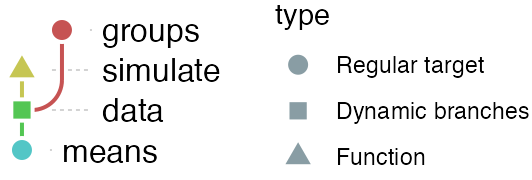
Nodes are drawn by their type, as targets::tar_visnetwork() does: a circle for a regular target, a square for a dynamic-branching one, and an up and a down triangle for imported functions and objects (which are in the graph with targets_only = FALSE). A legend names the shapes:
withr::with_dir(withr::local_tempdir(), {
  targets::tar_script({
    simulate <- function(group) rnorm(10, mean = match(group, letters))
    list(
      tar_target(groups, letters[1:3]),
      tar_target(data, simulate(groups), pattern = map(groups)),
      tar_target(means, vapply(data, mean, numeric(1)))
    )
  })
  tar_ggplot(targets_only = FALSE)
})
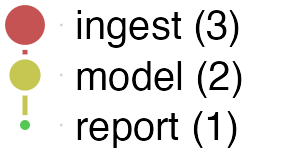
A pipeline of many targets is easier to read as a few stages. targets has no tag field for a target, but its description is free text, so a stage can go there (tar_option_set(description = ) sets it for a block of targets). collapse_by = "description" merges the targets that share one into a node, with their number in the label, and node_size and edge_width show those counts:
withr::with_dir(withr::local_tempdir(), {
  targets::tar_script({
    tar_option_set(description = "ingest")
    ingest <- list(
      tar_target(raw_data, 1:10),
      tar_target(clean_data, raw_data * 2),
      tar_target(features, clean_data + 1)
    )
    tar_option_set(description = "model")
    model <- list(
      tar_target(fit_mean, mean(features)),
      tar_target(fit_median, median(features))
    )
    tar_option_set(description = "report")
    report <- list(tar_target(report_text, c(fit_mean, fit_median)))
    tar_option_set(description = character(0))
    c(ingest, model, report)
  })
  tar_ggplot(collapse_by = "description", node_size = "n", edge_width = "n")
})
See the “Collapsing a pipeline by stage” section of ?tar_ggplot for the details, and for a column of your own instead of description.
Example: any directed acyclic graph
ggplot_dag()/as_dag() work with any edge-list data frame, not just a targets pipeline:
edges <- data.frame(
  from = c("a", "a", "b", "c"),
  to = c("b", "c", "d", "d")
)
nodes <- data.frame(
  name = c("a", "b", "c", "d"),
  type = c("input", "process", "process", "output")
)
ggplot_dag(as_dag(edges, nodes = nodes), node_color = "type")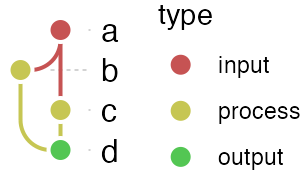
See vignette("ggtargets") to get started, and browseVignettes("ggtargets") for more (customizing the style, other inputs, how the layout works). A few more articles (collapsing a pipeline, colors, working with ggplot2, a gallery) are pkgdown-only for now, since the package doesn’t ship them to keep install-time dependencies light - build the site locally with pkgdown::build_site() to read them.
Acknowledgements
The metro style and its default color palette are reproduced from dagviz by Wim Yedema (Apache-2.0), and the workflow-diagram use case is inspired by snakevision by OpenOmics (MIT). The code was mostly rewritten by Anthropic AI models Claude Sonnet 5 and Opus 5.5. ggtargets is an independent package: it is not part of rOpenSci’s targets project.